TOC
Adding a Visual Feedback Loop to Spec-Driven Development
Adding a Visual Feedback Loop to Spec-Driven Development
The Gap
I've been building with Spec Kit — GitHub's toolkit for Spec-Driven Development (SDD). You write what you want in plain language, and a chain of Artificial Intelligence (AI)–driven slash commands turns it into working code: /specify refines the idea, /plan decomposes it, /tasks breaks it into work, /implement does the coding.
It's brilliant at the logic layer. But nowhere in that chain does anyone look at the app and say "this doesn't look right."
You approve language. You approve architecture. You approve task order. You never approve the picture. By the time a User Interface (UI) exists, the Large Language Model (LLM) has been painting something you never actually signed off on.
That gap is what spec-kit-extension-wireframe fills.
How It Works
The loop, front to back:
/speckit.specify              → spec.md
/speckit.wireframe.generate   → Scalable Vector Graphics (SVG) mockups
                                (light theme for frontend, dark for backend)
/speckit.wireframe.review     → iterate until you approve
                                [sign-off writes wireframe paths into spec.md]
/speckit.plan                 → reads spec.md, now knows the visual
/speckit.tasks                → derives tasks that honor the layout
/speckit.implement            → builds matching what you approved
The trick is that Spec Kit's existing chain already treats spec.md as the constraint for every downstream command. So on wireframe sign-off, the extension writes the approved wireframe paths into spec.md under a ## UI Mockup section. No changes to core Spec Kit required — the visual becomes part of the spec, and /plan / /tasks / /implement pick it up automatically.
Why the spec.md Approach Matters
When I first planned this extension, I thought I'd need to invent a new binding primitive — some way to tell /plan and /tasks "also honor the wireframe." Then I read Spec Kit's command templates and saw that every downstream command already calls Load context: spec.md. The binding was free; I just needed to write into an artifact the chain already read.
This pattern generalizes. Extensions that add new inputs to Spec Kit don't need to modify core commands — they just need to write into one of the constraint artifacts (spec.md, plan.md, tasks.md, constitution.md) that the chain already loads. The extension system gives you hooks for when to run; the artifact chain gives you hooks for what downstream commands see.
Try It
Live demo: https://tortoisewolfe.github.io/spec-kit-extension-wireframe/
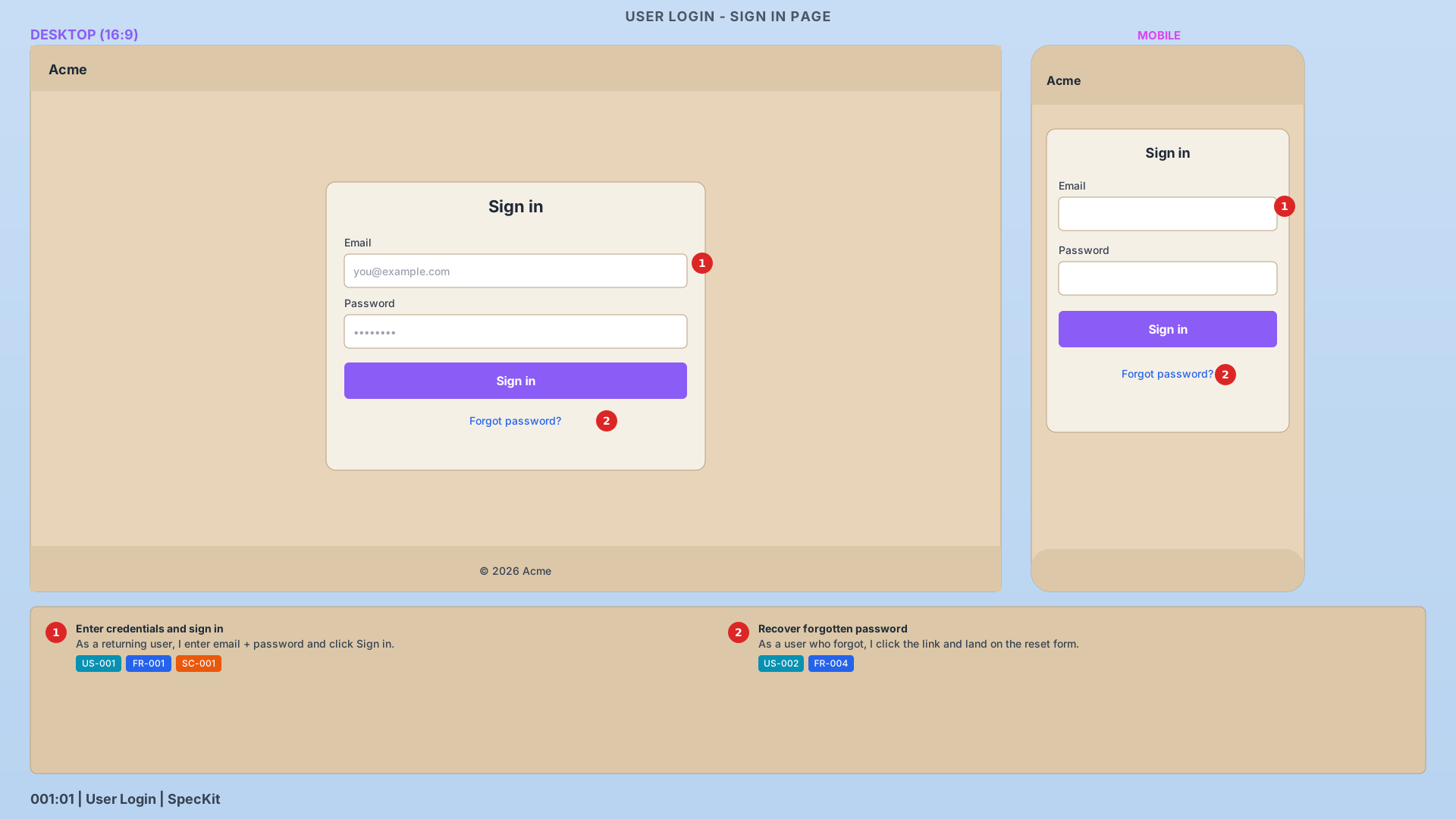
The demo ships with two sample wireframes — a light-themed login page mockup and a dark-themed authentication flow diagram — so you can see both themes in action and poke at the keyboard shortcuts (L or ? for the legend, F for focus mode, arrow keys for navigation, +/- for zoom).
Install into your own Spec Kit project:
specify extension add --dev https://github.com/TortoiseWolfe/spec-kit-extension-wireframeOnce the community catalog Pull Request (PR) merges, specify extension add wireframe will work directly without the --dev flag.
What Ships in v0.1.0
- 6 commands:
generate,prep,review,inspect,screenshots,view - 3 workflow hooks:
afterspecifyoffers wireframe generation right after spec creation;beforeplanprompts for sign-off before planning locks in;after_implementqueues a regression check against signed-off wireframes - Interactive browser viewer with dynamic navigation, keyboard shortcuts, zoom, focus mode, and status badges derived from review files
- Light/dark SVG theme templates following a frontend-vs-backend convention (tan parchment for User-facing screens, charcoal slate for architecture diagrams)
The Theme Convention
One opinionated call the extension makes: light theme for frontend features, dark theme for backend. Not because it looks cool — because the two feature types want different things from a wireframe.
Frontend features care about spatial layout: where does the Call To Action (CTA) go, how do touch targets sit on a 44-pixel grid, what does the mobile layout collapse to. Light theme, desktop + mobile side-by-side, callouts on every interactive element.
Backend features care about data flow and control flow: where does the token come from, who checks it, what happens on error, what's rate-limited. Dark theme, full-width architecture diagram, flow arrows colored by path (purple for happy, green for success terminal, red for failure).
You can override with --theme light|dark|both, but the default matches what each feature type is actually trying to communicate.
What's Next
The extension is v0.1.0. The after_implement hook is wired but the actual implementation-vs-wireframe diff isn't shipped yet — that's v0.2 territory (think: Playwright captures of the built User Interface (UI), cropped to match wireframe regions, fed through a perceptual diff). Diff mode in the viewer (side-by-side comparison of two wireframes) is also on deck.
If you're using Spec Kit and this sounds like a gap you've felt too, I'd love to hear about it. And if it saves you time, buy me a coffee — it funds the maintenance that keeps the tools free and open source.
Links:
- Extension repo: github.com/TortoiseWolfe/spec-kit-extension-wireframe
- Live demo: tortoisewolfe.github.io/spec-kit-extension-wireframe
- v0.1.0 release notes: releases/tag/v0.1.0
- Catalog Pull Request (PR): github/spec-kit#2262
- Superseded Pull Request (PR): github/spec-kit#1410 (earlier attempt, now closed)
